Buyer's guide
Wall printer buyer's guide
Seven steps from "what would I print" to a decision you can defend. Each one has a short answer, a few things to check and links to the longer articles.
Know your walls before you look at machines. Compare complete packages in writing, not machine prices. Watch your own file print. Learn the upkeep. Run job numbers with honest inputs. Talk to the people who'd pay you before you forecast. Then talk to owners, and decide.
Last reviewed October 27, 2026. Written by the team at The Wall Printer® in Wilmington, NC.
Define the work
Start with the walls, not the machine. Which surfaces, indoors or out, how big, how tall and how often. That decides which printer fits, or whether one fits at all.
- Walls, floors or both. Floors need the Floor Series.
- Surfaces: drywall, brick, block, wood, glass, metal. Very deep texture like corrugated metal is a poor fit.
- Height: the Pro and Tech Series print up to 11 feet.
- Access: floor space in front of the wall and power nearby.
- Indoor or outdoor. Every outdoor wall needs a conversation first.
Compare complete packages
Put every quote on the same terms: machine, ink, software, training, warranty, support, shipping and taxes. A machine price and a package price aren't the same number.
- Our packages: Pro Series $44,995, Tech Series $39,995, Floor Series $39,995, certified reconditioned from $29,995.
- Warranty years and what they cover. Ours is up to five years on new printers, six months on reconditioned.
- Training: in person on the machine, or videos.
- Software: any annual fee. Ours has none.
- The date on the quote and how long it holds.
Judge the output yourself
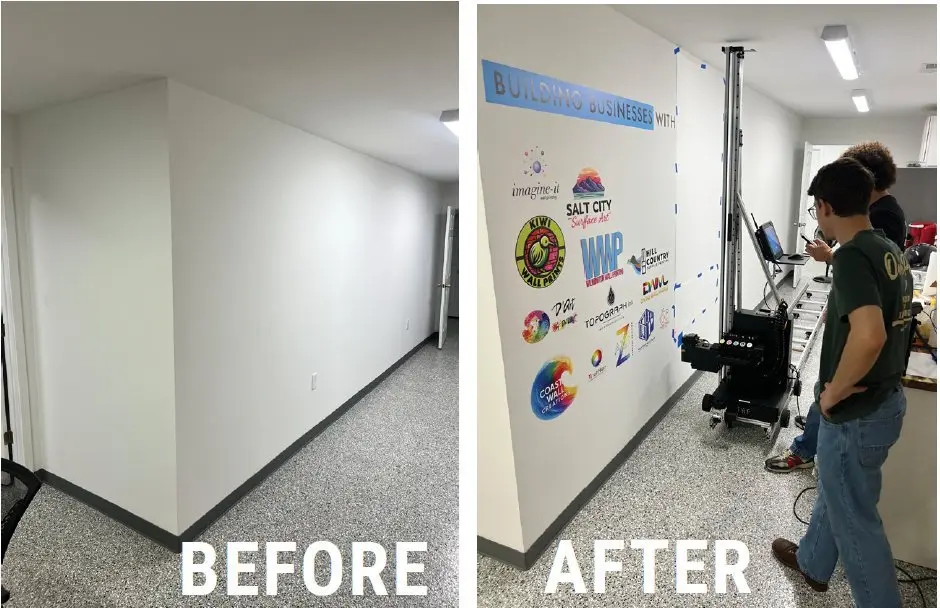
Photos online are the best prints a seller has. Watch your own file print on your kind of surface, at the setting you'd sell, and time the whole job.
- Same artwork, same surface, same resolution with every seller.
- Time setup, printing and breakdown separately.
- On dark surfaces, look at the white layer under the color.
- Speed: ours prints 10 to 20 sq ft an hour, depending on resolution and surface.
Know the upkeep and the support
Every UV printer needs a routine. Learn what it is before you buy, what wears out, what it costs and who answers when something looks wrong.
- Maintenance: about 20 minutes every other day the printer runs.
- Ink: the pump box circulates it every 12 hours on its own.
- Print head: about $2,000 on the Pro, about a year to a year and a half on UV ink.
- Support: 9am to 8pm ET, seven days a week, for as long as you own the printer.
- Ask every seller to put repair responsibilities in writing.
Run the job numbers honestly
Separate what a job brings in from what it leaves. Count travel, setup, labor, waste and the months it takes to build a client list, not only ink.
- Most printed jobs sell for $20 to $40 a square foot. Most owners set a $500 minimum.
- Ink is about 50 cents a square foot.
- Setup and breakdown take about 30 minutes.
- Run a slow case, not only the one you hope for.
Check demand before you forecast
The printer prints. It doesn't find clients. Talk to the people who'd pay you, and quote a few real walls, before you count on a number of jobs a month.
- Name ten businesses or people you could call this month.
- Quote three real walls with photos and measurements.
- Decide who on your team runs the printer.
- Plan for slow months while you build the list.
Demo, talk to owners, decide
Bring the same test file to every seller, score each one on what matters to you, and mark anything you couldn't confirm as unknown. Then call owners who aren't connected to the seller.
- Ask for two owner references who've run the machine for a year or more.
- Ask about a job that went wrong and how support handled it.
- Get the final package, warranty and delivery date in writing.
A muralist gives you an interpretation of what you asked for. I give you exactly what you asked for. I'm not art, I'm precision.
Take it with you
The buyer's checklist
Tick what you've confirmed. Print it and bring it to every demo. Nothing here is saved or sent.